Edit an atom array and drive waveforms
Create 双原子 Analog 实验 (two-atom Analog experiment) from the workbench and select Analog in the notebook. Run the original template and keep its result before changing one parameter.
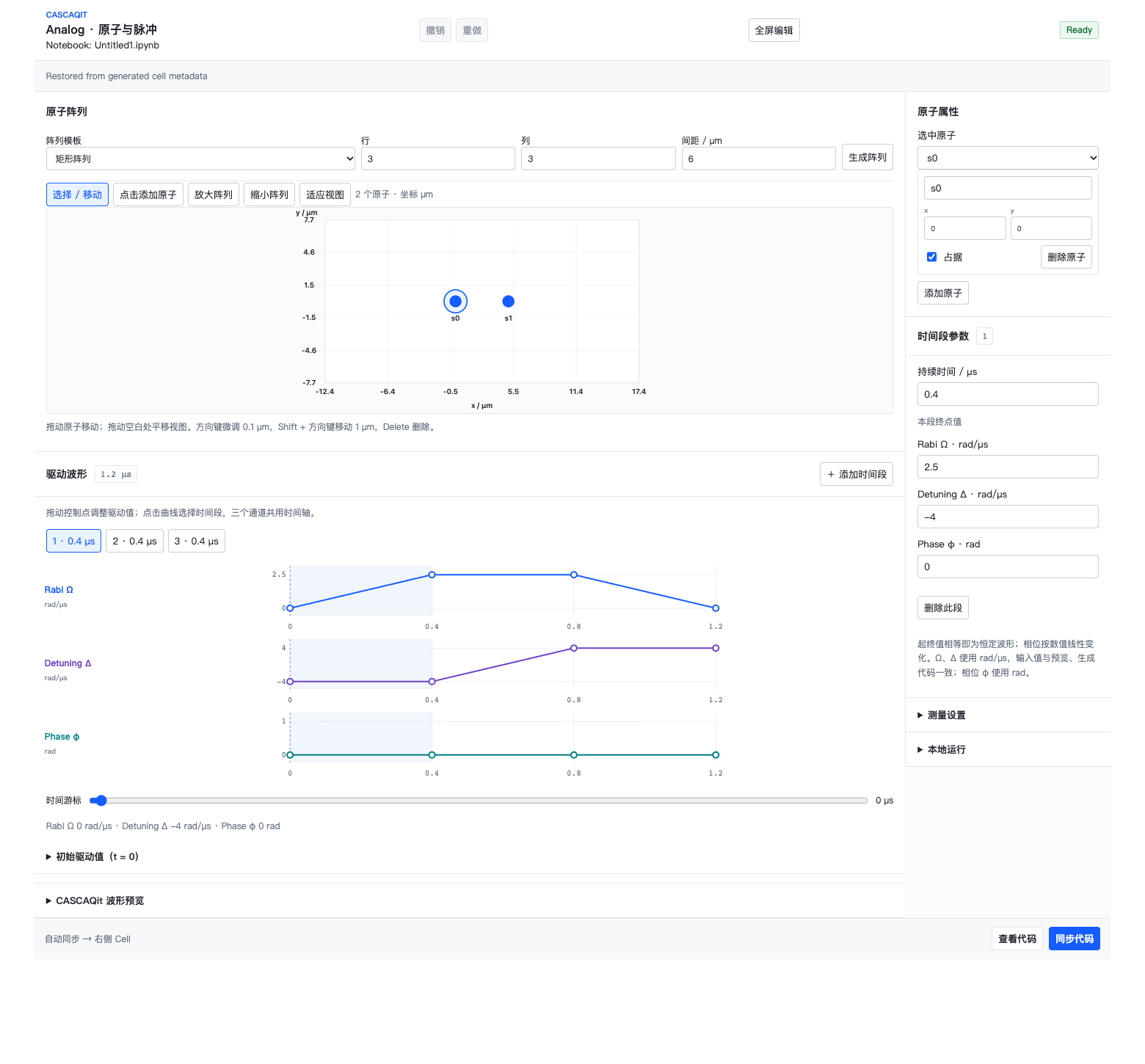
The two-atom template in full-screen editing mode. Read coordinates above, inspect all three waveforms below, and adjust the selected segment on the right. The array form replaces the canvas only after you select 生成阵列 (Generate array). Open full-size image
Atom positions
Array templates include rectangular, triangular and one-dimensional layouts. Enter the dimensions and spacing, then select 生成阵列. This replaces the current array and can be undone. The editor accepts templates with 1–64 atoms; that range does not establish that your machine can simulate every 64-atom experiment.
Coordinates and spacing use μm. Select an atom to edit coordinates and occupancy, or drag it on the canvas. Arrow keys move it by 0.1 μm; Shift plus an arrow moves it by 1 μm. Delete removes it. Drag empty space to pan, and use the toolbar to zoom or fit the view.
Check the actual coordinates and occupancy before interpreting interactions. Zooming the canvas does not change physical separation.
Waveforms and units
| Quantity | Unit in the editor and generated code |
|---|---|
| Time and segment duration | μs |
| Rabi Ω and Detuning Δ | rad/μs |
| Phase φ | rad |
The three channels share time segments. Select an interval and use 时间段参数 to change its duration and channel endpoints. Adding or removing a segment affects all three channels. Initial values can be edited separately; the time cursor shows values at the selected time.
A Detuning value of 4 means 4 rad/μs, not 4 MHz. If an experimental parameter is given as frequency f, use the physical-units lesson to decide whether a 2πf conversion is needed.
The CASCAQit waveform preview displays derived program data; it is not the source used to reconstruct the editor. Bokeh plots support pan, zoom and hover. Read the Phase axis in rad separately from the Rabi/Detuning axes in rad/μs.
Make a controlled comparison
- Keep the two-atom template and its waveforms, and check that code synchronization reports no validation errors.
- Record shots, seed and Analog simulation time steps under 本地运行.
- Run the generated cell or select Run in the editor, then save the result.
- Change only the atom spacing or one detuning endpoint, rerun, and keep a separate record.
Compare probabilities, counts and diagnostics, rather than relying on bar heights alone. If a conclusion depends on fine detail, increase the time-step count and check convergence. Shots control sampling; time steps control simulation discretization. One cannot substitute for the other.
The current editor uses global Rabi, detuning and phase controls. Write local controls and Hybrid programs in Python using the relevant SDK course. Validation or compilation against MockNeutralAtomTarget does not establish execution on real hardware.
Valid edits update code without executing it. If manual changes put the cell into Detached, follow the preservation steps in the Digital guide.